








TL;DR
- SLAs measure speed, not quality: A ticket closed in 30 minutes can still represent a poor customer experience if the user was kept in the dark.
- Fragmented ecosystems are the main enemy: Multiple Jira instances, external data sources, and siloed teams create invisible friction for end users.
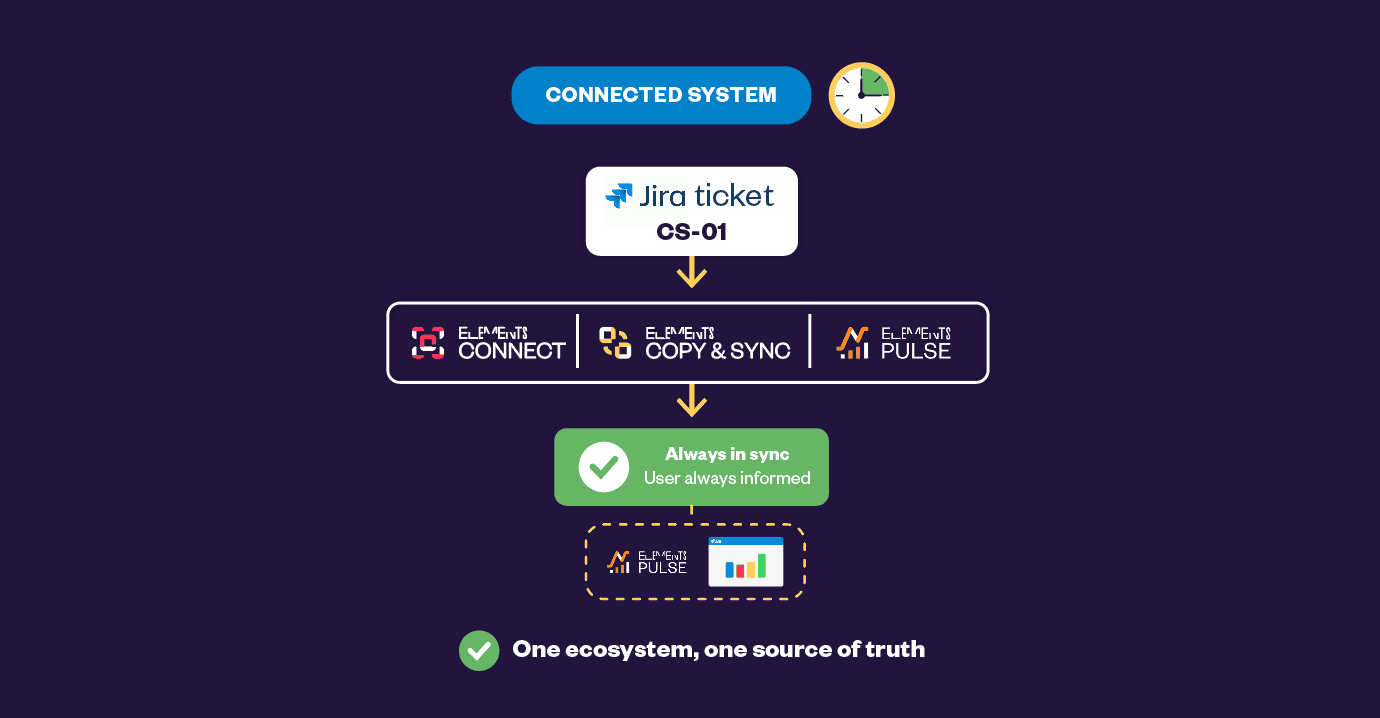
- Elements Connect surfaces external data directly in Jira: Support agents and users see the right information at the right time and right place without switching tools.
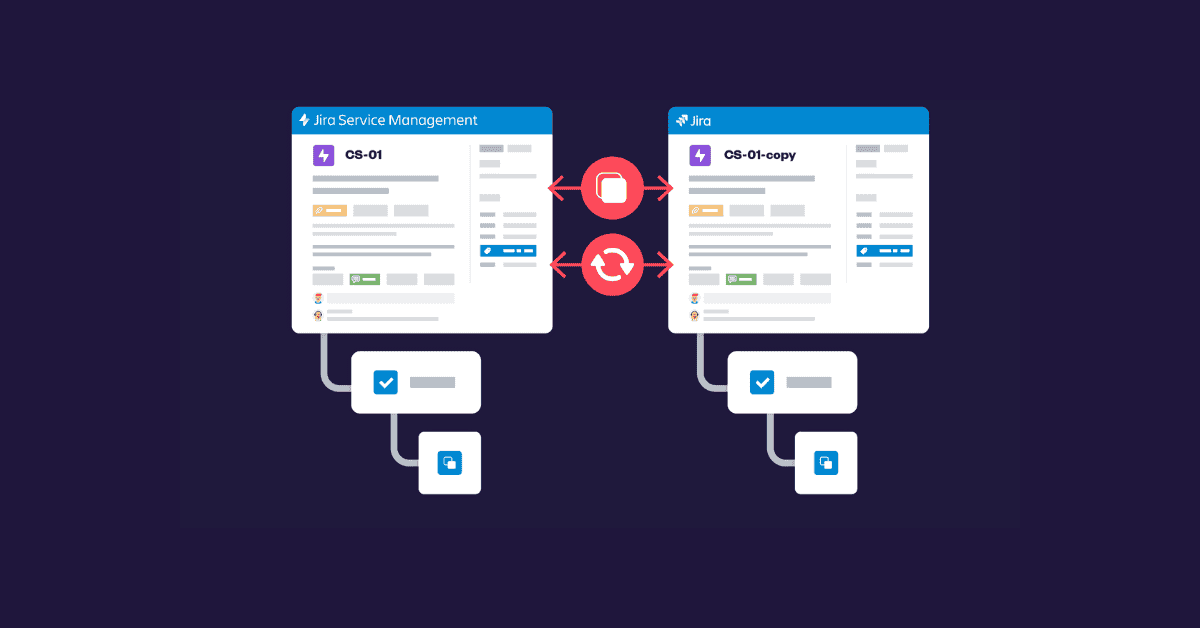
- Elements Copy & Sync bridges separate Jira instances in one click: Escalations are synchronized automatically, work item fields, statuses, comments, and attachments included.
- User-centric design reduces both mean time to resolve and frustration: When every stakeholder works from the same data, support becomes seamless and scalable.
SLAs tell you whether a ticket was closed on time. They don’t tell you whether the customer got a useful answer, understood what was happening, or had to repeat themselves three times across different teams. Customer satisfaction in Jira starts where SLAs stop, and it requires rethinking how data, teams and Jira instances connect.
Why are SLAs not enough to measure customer satisfaction in Jira?
Service Level Agreements are a contractual baseline. They measure a single dimension, response or resolution time, and declare success the moment a timer stops. But user expectations have shifted. People expect support to feel like Amazon tracking: transparent, proactive, and frictionless. An SLA met with a vague first reply, and three follow-up pings is not a good experience.
What does customer satisfaction mean in a Jira ITSM context?
Customer satisfaction in Jira ITSM means the end user received accurate, timely information throughout the ticket lifecycle, not just a response within a defined time window. It involves transparency (the user knows where their issue stands), relevance (the agent had the right data to act), and seamlessness (the user never felt transferred between disconnected systems).
Beyond the user side, SLAs can also hide internal dysfunction. Because teams work in silos, IT, HR, Engineering, and external vendors, information gets lost between handoffs. A ticket may be resolved “on time” from a process standpoint while three agents manually copy-paste data across tools in the background. That hidden friction compounds over time into agent burnout and inconsistent service quality.
| Metric | What it measures | What it misses |
|---|---|---|
| SLA compliance rate | Whether a response was sent within a time box | Quality, accuracy, and usefulness of that response |
| First response time | Speed of initial acknowledgement | Whether the agent had context to actually help |
| Resolution time | How fast was the ticket closed | Whether the root cause was addressed or just acknowledged |
| CSAT score (user survey) | Perceived quality of the interaction | Structural reasons behind low scores (data gaps, silos) |
| Escalation rate | Frequency of tier-2 involvement | Smoothness of the escalation from the user’s perspective |
What causes fragmented customer experience in Jira environments?
Most Jira environments that struggle with customer satisfaction share the same structural problem: the information a support agent needs to help a user is scattered across systems that don’t naturally communicate with each other.
- External data sources (asset databases, CMDBs, fleet registries, HR systems) that live outside Jira
- Multiple Jira instances, often created after mergers, acquisitions, or departmental splits
- Mixed toolsets: Jira Service Management for support, Jira Software for engineering
- Manual escalation processes that require copy-pasting between systems
- No shared visibility between the requester and the teams working on the ticket
What is the biggest ITSM challenge when using multiple Jira instances?
When two teams operate in separate Jira instances, for example, after a merger, escalating a request between them requires manual duplication of data. Without synchronization, comments, attachments, and status updates stay isolated. The user sees one ticket; the backend may involve two or three disconnected records that no one manages consistently.
How Elements Connect improves customer experience in Jira
Elements Connect is an app for Jira that pulls data from external sources, databases, REST APIs, LDAP directories, and CMDBs into Jira.
The result: support agents see asset details, component specifications, or customer records directly on the request, without leaving Jira. Portal users get filtered, context-aware forms that guide them to fill in the right information.
How does Elements Connect help support agents?
When a user submits a request, Elements Connect can auto-populate fields based on their selections. For example, choosing “Battery” as a component category dynamically filters the exact sub-components available for that asset. The ticket arrives at the agent with rich context already attached, no back-and-forth to gather basic information.
| Without Elements Connect | With Elements Connect |
|---|---|
| The agent asks the user for asset reference manually | Asset data auto-populated from an external source on ticket creation |
| User fills in a generic form, may omit critical fields | Portal form dynamically filters options based on the user’s context |
| Routing is manual or based on simple Jira rules | Ticket routed to the right queue based on external field values |
| The agent switches between tools to get technical details | All external data is visible inline on the Jira ticket |
Can Elements Connect improve the self-service portal experience?
Yes. The portal is often the first and most frustrating touchpoint for end users. Elements Connect lets admins build dynamic forms where each selection narrows the next field. A truck driver selecting a vehicle type sees only the components relevant to that vehicle. Read-only fields confirm what the system already knows, so users feel guided rather than interrogated. This reduces incomplete submissions and accelerates triage on the agent side.
How Elements Copy & Sync enables seamless cross-instance escalation
Elements Copy & Sync solves a specific and common problem: when a ticket needs to move either to another Jira instance, another project, or another team, the agent should not have to do it manually. The app creates a synchronized clone with a single click. From that moment, any update on either ticket (field, status change, comment, attachment) is mirrored in real time across both instances.
How does Elements Copy & Sync work across two Jira instances?
When an agent identifies that a ticket needs to be escalated to a separate Jira instance, they move the ticket to the status that automatically triggers the clone with one click. Elements Copy & Sync creates a Jira linked issue in the target instance, pre-populated with all relevant fields, attachments, and comment history. Any subsequent update, status transition, or new comment is automatically synced back to the original ticket in real time. The end user sees a single, continuously updated ticket on their end.
| Escalation scenario | Manual process | With Elements Copy & Sync |
|---|---|---|
| Ticket needs to go to a second Jira instance | Agent manually creates ticket, copies fields and description | One-click clone with all fields and attachments pre-filled |
| Status update in instance B | Agent manually updates instance A, or it never gets updated | Automatic sync between both tickets reflects the same status |
| Engineer adds a resolution comment in instance B | Agent must check the other instance manually, no notification, no sync | Comment appears automatically in instance A |
| End user checks the portal | May see stale status, no visibility on escalation progress | Portal reflects the real-time state, transparent to the user |
A real-world example: ITSM at scale in the automotive industry
An automotive company managing a large fleet of commercial trucks faced a compounded support challenge: their IT environment included two separate Jira instances (from a merger), an external database of component and battery data, and a need to route issues between Jira Service Management and Jira engineering teams. Users, truck drivers reporting field failures, needed fast, transparent support without understanding any of this complexity.
Step 1: User submits request via the JSM portal
- Clara, a truck driver, reports a battery failure via the Jira portal
- Elements Connect pulls the vehicle data from the Jira external database into connected custom fields available in the Jira forms
- She selects the component category (“Battery”), which dynamically filters available sub-components
- She selects the sub-components, which automatically populate read-only fields
- The ticket is auto-routed to the “Critical” queue based on the component type
Step 2: Support agent triages and escalates
- Suzie sees the ticket with full external data already visible, no manual lookups needed
- She identifies the manufacturer as Company B (the acquired company, in a separate Jira instance)
- One click with Elements Copy & Sync creates a synchronized clone in Company B’s Jira
- Clara receives an update, her ticket is active and in the right hands
Step 3: The engineer resolves, and the user sees the result
- Carlos (Company B engineer) receives the ticket pre-loaded with the same external data, same source, both instances
- He resolves the issue and marks it “Done” with a resolution comment
- In Company A’s Jira, the original ticket automatically transitions to “Done” and the comment appears
- Clara checks her portal and sees the issue resolved. She never knew multiple systems were involved
What results does this approach produce?
The gains from this setup operate at three levels simultaneously. For end users: transparency and speed, with no perception of being transferred between systems. For support agents: less manual work and fewer errors, since data flows automatically. For the organization: better collaboration across instances and a reduced risk of SLA breaches caused by escalation delays.
How can organizations measure the impact of this approach on customer satisfaction?
Beyond SLA compliance, teams should track: CSAT scores collected after ticket resolution, the number of user-facing status updates per ticket (more updates = more transparency), escalation cycle time (how long between the original ticket and the first update from the escalated team), and ticket re-open rate (a proxy for resolution quality). These metrics collectively give a more complete picture of experience quality than time-based SLAs alone.
How to implement customer experience management in Jira: a practical checklist
Moving from SLA-centric to experience-centric support in Jira requires changes at three levels: data integration, process automation, and visibility design.
| Layer | Action | Tool |
|---|---|---|
| Data integration | Connect external data sources to Jira fields (CMDBs, asset DBs, customer records) | Elements Connect |
| Portal design | Build dynamic request forms that filter fields based on user context | JSM Portal (admin) + Elements Connect |
| Routing automation | Auto-assign tickets to the right queue based on component or priority field values | Elements Connect + Jira |
| Cross-instance escalation | Set up synchronized cloning rules between Jira instances or projects | Elements Copy & Sync |
| End-user visibility | Configure the portal to reflect real-time status updates from all involved instances | JSM portal + Elements Copy & Sync |
| Satisfaction measurement | Track experience data alongside SLA | Jira Service Management + Elements Pulse |
Conclusion: Customer satisfaction in Jira is a design decision
SLAs will always have a role in ITSM governance, but they measure process compliance, not human experience. True customer satisfaction in Jira comes from designing support workflows around how users actually feel: informed, not guessed at; guided, not interrogated; updated proactively, not left in the dark.
The combination of Elements Connect (for dynamic external data in Jira forms and requests) and Elements Copy & Sync (for cross-instance work item synchronization) turns a fragmented Jira environment into a coherent experience for every stakeholder in the chain, from the end user submitting a request to the engineer resolving it two instances away.
The starting point is not a tool selection; it is a question: “What would a seamless experience look like for the person submitting this ticket?” Every process and integration decision should work backwards from that answer.
Is your data trapped in silos across disconnected tools?
See how the lack of integration between your apps is killing your team’s productivity, and discover the exact strategy to orchestrate a frictionless IT ecosystem.