




How to clone a Jira work item across instances without losing context: an automotive support story

TL;DR
A truck driver reports a battery failure through a support portal. Behind the scenes, that request travels across two Jira instances, an external database, multiple teams, and two separate companies before the problem is resolved.
For the customer, the process should feel simple. For support teams, it rarely is.
This article follows the journey of a single Jira work item through three people; Clara, Suzie, and Carlos, and explores how connected workflows help automotive organizations eliminate manual handoffs, preserve context, and deliver a more seamless support experience.
Engineering became agile. Customer service didn’t.
Over the last decade, automotive organizations have invested heavily in making engineering and product development faster, more connected, and more agile. Yet many customer-service processes still rely on the same fragmented workflows they used years ago.
The challenge is not difficult to understand. Modern vehicles are designed, manufactured, and serviced by an ecosystem of partners, suppliers, and service providers. Each organization has its own tools, workflows, permissions, and data sources. When a customer reports a problem, information often needs to travel across multiple teams before anyone can resolve it.
Unfortunately, information rarely moves as smoothly as the work itself.
Communication remains the most-cited topic in negative automotive reviews, with negativity increasing by 6.4% year over year across more than 8 million Google reviews. At the same time, research shows that support agents can spend up to 40% of their productive time switching between tools, searching for information, and manually transferring data instead of helping customers. (HBR / Unthread)
The result is a support chain that often feels disconnected, even when every team involved is working hard to solve the problem.
One customer request. Three people. Two companies.
Let’s look at a typical support scenario.
Clara is a truck driver. During a delivery route, she notices a battery failure and submits a request through her manufacturer’s Jira Service Management portal.
Her request is picked up by Suzie, a support agent responsible for investigating the problem and coordinating next steps.
As the investigation progresses, Suzie discovers that the battery component was supplied by another company. The request now needs to be escalated to Carlos, an engineer working in a completely separate Jira instance.
Three people become involved.
Two companies need to collaborate.
Several systems need to exchange information.
Yet Clara should never feel that complexity.
That is the real challenge many automotive organizations face today: creating the experience of a single support team when the reality is a highly fragmented ecosystem behind the scenes.

Clara’s journey starts with better information
For most customers, support begins with a form.
Unfortunately, many support forms collect only basic information and leave support teams to gather the missing details later. This often leads to follow-up calls, repetitive questions, and delays before meaningful work can even begin.
In automotive environments, those missing details can include vehicle specifications, component references, supplier information, warranty data, or service history.
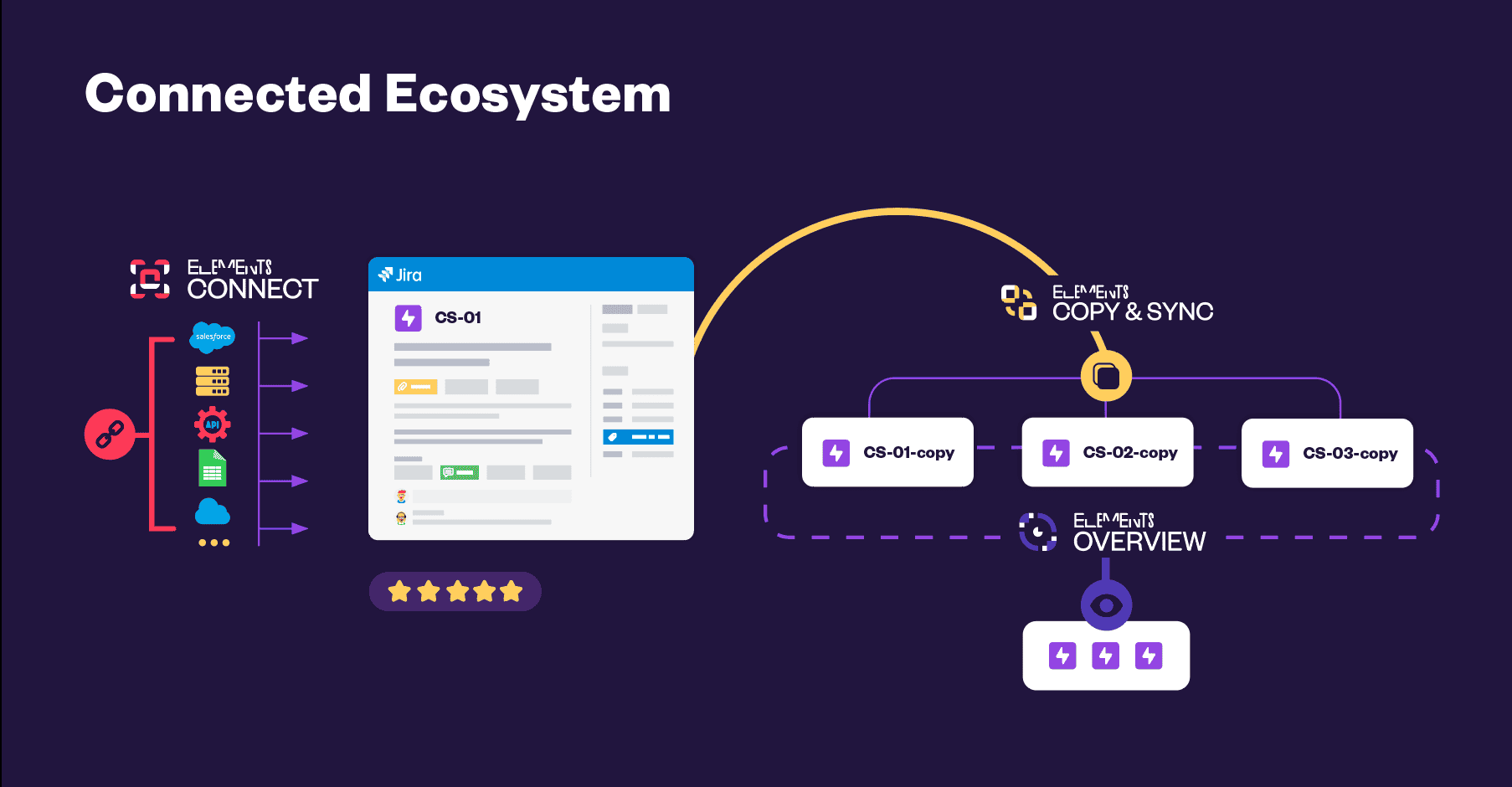
Instead of forcing agents to retrieve that information manually, external data can be surfaced directly inside Jira at the moment a request is created.
When Clara submits her request, vehicle information is automatically retrieved from an external database and populated into Jira custom fields. If she selects “Battery” as the affected component, only relevant sub-components become available, making the process easier for her and more accurate for the support team.
The work item can then be automatically routed to the correct queue based on the information retrieved from external systems.
From Clara’s perspective, nothing remarkable has happened. She simply submitted a request.
Behind the scenes, however, the support team receives a work item enriched with context, making it easier to move directly into investigation rather than spending time gathering information.
How to clone a Jira space from one instance to another without creating more work
Once Suzie begins investigating the request, she quickly identifies that the battery was manufactured by Company B.
At this point, many support processes start to break down.
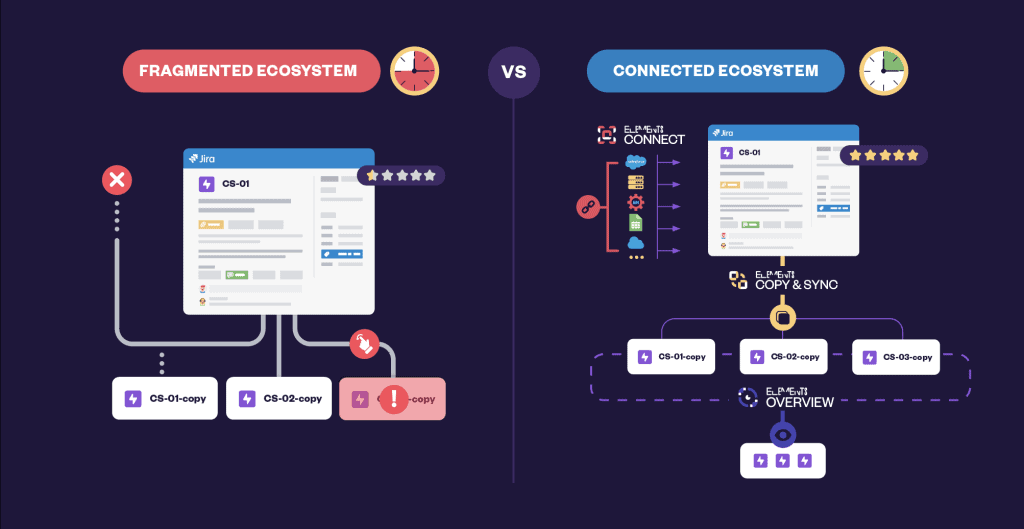
Traditionally, the next step would involve searching multiple systems, collecting information manually, creating an email, attaching screenshots, and sending everything to the supplier. The supplier would then recreate the request in their own Jira environment and begin their investigation from scratch.
The process works, but it creates friction at every step.
Context gets lost.
Attachments are missed.
Updates become difficult to track.
And the moment the request leaves Jira, visibility starts to disappear.
Instead of recreating the work, Suzie can clone the Jira work item directly into Company B’s Jira instance. The escalation happens in a single action, while preserving the information that has already been gathered.
The supplier receives the same context, attachments, and supporting information without anyone having to manually re-enter data.
Most importantly, Clara remains connected to the process. Her request doesn’t disappear into an email thread or a black box. She knows that her case is active and progressing, even though another company is now involved.
Carlos receives context instead of another email
By the time the request reaches Carlos, the groundwork has already been done.
Rather than receiving a fragmented email with partial information, he receives a work item that already contains the context needed to begin the investigation. Vehicle information, battery references, escalation history, and supporting documentation are all available from the start.
That distinction may seem small, but it has a significant impact on efficiency.
Many engineering teams spend valuable time reconstructing information that already exists somewhere else in the process. They ask questions that have already been answered. They request details that another team already collected. They recreate context before they can begin solving the actual problem.
When the context travels with the work item, engineers can focus their effort where it creates value: diagnosing and resolving the issue.
Jira work item sync keeps everyone aligned
Resolving the technical issue is only part of the customer journey.
The second challenge is making sure everyone remains informed throughout the process.
Without synchronization between systems, support teams often find themselves manually updating statuses, copying comments between environments, and trying to keep customers informed while information is scattered across multiple tools.
This creates unnecessary delays and increases the risk of inconsistent communication.
When work items are synchronized across Jira instances, updates flow automatically between both sides of the process.
As Carlos progresses through his investigation, Suzie automatically receives the information she needs to keep Clara informed. And when the problem is ultimately resolved, that resolution is reflected across the connected work items, allowing Clara to immediately see that her request has been completed.
The customer experiences a continuous conversation rather than a series of disconnected interactions.
The hidden value: turning support requests into operational insight
The benefits extend beyond individual requests.
While faster escalations and better visibility improve day-to-day operations, connected support processes also create opportunities to identify larger patterns.
Imagine that Carlos notices multiple battery-related requests arriving over a short period of time. Individually, those requests may appear unrelated. Viewed together, they could reveal a recurring defect or emerging quality issue.
By grouping related work items and surfacing context across requests, engineers gain visibility that would otherwise remain hidden inside separate tickets, email chains, and disconnected systems.
This shifts support from being purely reactive to becoming a valuable source of operational intelligence.
Instead of simply resolving today’s problem, teams can identify the root causes that prevent tomorrow’s problems from occurring.
The one-team illusion
Perhaps the most interesting part of this story is that Clara never sees any of the complexity taking place behind the scenes.
She doesn’t see the external database that supplied vehicle information.
She doesn’t see the second Jira instance.
She doesn’t see the synchronization rules, workflows, or escalations occurring between organizations.
What she experiences is a single support journey that feels transparent, responsive, and coordinated.
This is what we often call the one-team illusion.
Not because the organizations involved become a single team, but because they operate as though they were one. Information flows where it is needed. Context follows the work. Every stakeholder works from the same source of truth.
Suzie never needs to copy and paste information from one system to another.
Carlos starts every investigation with the context he needs.
And Clara remains informed throughout the process without having to chase updates or repeat information she has already provided.
Three people.
Two Jira instances.
One external database.
Zero manual handoffs.
Why customer experience matters more than SLA metrics
Service organizations often focus heavily on SLA performance, and understandably so. SLAs provide a measurable way to track responsiveness and operational efficiency.
However, customers rarely remember SLA compliance.
They remember whether they had to repeat themselves.
They remember whether they understood what was happening.
They remember whether the process felt frustrating or seamless.
In many ways, SLAs measure speed, while customers measure experience.
The organizations that stand out are not necessarily the ones closing work items the fastest. They are the ones that make complex support ecosystems feel simple, coordinated, and trustworthy.
When manufacturers, suppliers, engineers, and support teams all work from the same data, the customer doesn’t notice the complexity. They simply experience better service.
And that may be the most important metric of all.
FAQ
Why do we clone a Jira work item across instances?
A cross-instance cloning solution allows teams to create a corresponding Jira work item in another Jira instance while preserving custom fields, attachments, comments, and business context. This eliminates the need to recreate requests manually and reduces the risk of information loss.
What is Jira work item sync?
Jira work item sync keeps connected work items aligned across different Jira environments. Depending on the configuration, statuses, comments, attachments, and selected custom fields can be synchronized automatically.
Can Jira display external data inside work items?
Yes. Jira can surface information from external databases, asset repositories, CRMs, ERP systems, and other business applications, allowing teams to access critical information without leaving their workflow.
Why do support teams struggle when working across multiple Jira instances?
A common challenge is that information becomes fragmented across different teams, companies, and systems. Support agents often need to switch between tools, manually transfer data, recreate work items, or search for missing context. These manual handoffs can slow down resolution times, increase the risk of errors, and make it harder to maintain visibility throughout the support process. Connected workflows help reduce this friction by keeping information synchronized and accessible across environments.
Explore the connected support experience
Automotive support rarely happens within a single system or a single organization. The challenge is not simply moving requests between teams, it’s preserving context, visibility, and customer trust throughout the process.
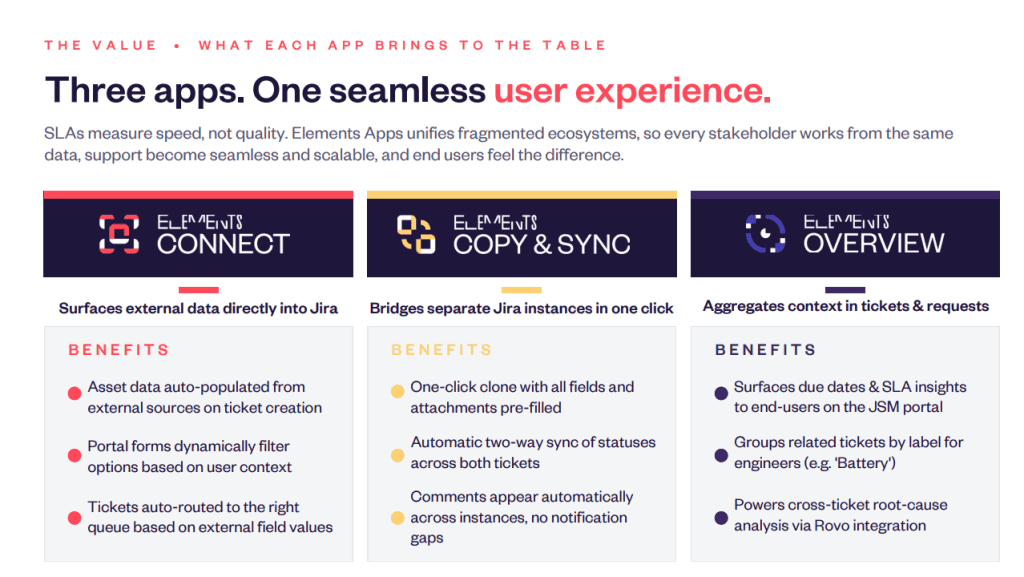
Solutions such as Elements Connect, Elements Copy & Sync, and Elements Overview help organizations bridge those gaps by surfacing external data, synchronizing work items across Jira instances, and providing the visibility needed to deliver a seamless support experience from start to finish.
About the author
Anahit Sukiasyan is an Atlassian Community Champion in Yerevan, Armenia, recognized for her dedication to fostering collaboration, innovation, and knowledge-sharing within the global Atlassian ecosystem.
With a strong background in IT Service Management, she has extensive hands-on experience with Jira, Jira Service Management, Confluence, Trello, and Jira Product Discovery, working across both Cloud and Data Center environments. Anahit specializes in end-to-end Jira project configuration, tailoring workflows, automation, and reporting to align with diverse business needs and improve operational efficiency.


