








TL;DR
| The core problem: By default, Jira tickets show what someone is requesting but not who they are in your system; agents must leave Jira to look up that context manually. Elements Connect bridges that gap: the app pulls real-time data from any REST API, database, or external system directly into custom Jira fields, visible in the ticket without any tab-switching. 38% reduction: Nebrija’s average ticket resolution time dropped by 38% after agents gained instant access to live student context directly inside each JSM request. No custom development required: the setup uses a configuration UI and FreeMarker dynamic query logic; no coding from scratch needed for Jira admins. The pattern works beyond education: any organisation where agents need customer, employee, or asset data before they can act on a ticket can apply the same approach. |
How Nebrija Surfaces External Data in Jira | 38% Faster
Serving 15,000+ students and Alumni across 6 countries is complex enough. Managing the support operations behind that scale, without giving agents the context they need to act, makes it harder than it has to be. For Nebrija University, the turning point came when live student data started appearing directly inside Jira Service Management tickets, eliminating the manual lookups that were slowing every single interaction down.
The implementation was led by Sngular, a long-standing Atlassian Solution Partner with deep expertise in JSM deployments. Elements Connect was the app that made external data visible inside JSM, without any custom development, bringing the average ticket resolution time down by 38%.
Who is Nebrija University and why did support need to scale?
Nebrija University is not a single campus. It is a conglomerate that includes a university, college, vocational training programs, student residences, and international institutes, with a presence in 6 countries, more than 15,000 students per year, and over 50,000 alumni. The support demands are closer to those of a large enterprise than a traditional academic institution.
Before moving to Jira Service Management, Nebrija’s support operations ran on a home-grown PHP platform. The service catalog was scattered, forms were basic and similar for each request type, and there was no unified experience across departments and entities.


When Sngular came in to lead the migration to Jira Service Management, the ambition was clear: build a modern, scalable service operation, one where agents could focus on resolving issues, not on hunting for information.
Why were JSM agents working without requester context?
In a standard JSM setup, a ticket tells you what someone is requesting. It does not tell you who they are in your systems.
For Nebrija’s support team, this gap had a real operational cost. A student submitting a request about a certificate, a software access issue, or a campus administrative problem expects a fast, informed response. But before an agent could act, they needed to answer basic questions: Is this person currently enrolled? In which faculty? On which programme? Are they administratively blocked? Have they completed the required credits?
None of that information was visible in Jira. Agents had to log into the university’s student information system separately, search manually, then return to Jira to start working on the request.
This context-switching was adding days to average first time to response and resolution time, across every ticket, every day.
“The goal was to give agents a 360° view of the requester, pulling real-time data from across the university’s ecosystem, right inside Jira.” – Sngular project team
How does Elements Connect display external data in Jira?
Elements Connect is an app that connects Jira work items to external data sources, REST APIs, SQL databases, LDAP directories, and displays the returned data as native Jira fields, directly on the issue view; No tab switching; No manual lookup; No duplication.
Sngular configured Elements Connect to query Nebrija’s internal student information system automatically every time a ticket is opened. Using the reporter’s email address as the dynamic identifier, the app called the university’s REST API and populated a dedicated panel, Datos alumno (student data), in the ticket, visible to agents immediately.
What data appears on each Jira ticket?
| Field | Examples of what it shows |
| Student ID (NIA) | Unique university identifier |
| Full name | From the university system |
| Faculty | e.g. Facultad de Derecho y Relaciones Internacionales |
| Programme | e.g. M164 Master en Prevención de Riesgos Laborales |
| Enrolment year | e.g. 2024 |
| Last enrolment | e.g. 2025 |
| Credits completed | e.g. 60 |
| Administratively blocked | Yes / No |
| Enrolment cancelled | Yes / No |
| University and personal email | From the university system |
This data loads at ticket open and requires zero action from the agent.
How does the dynamic query pull the right record?
The query path uses FreeMarker templating to identify the requester and retrieve the correct record. If the requester is not a student (staff, contractors, or internal users with different email domains), the field stops gracefully rather than returning an error. The same configuration principle applies to any organisation integrating employee, customer, or asset data into Jira.
How do JSM, Elements Connect, and Refined work together?
Elements Connect solved the agent context problem. But the Nebrija transformation also addressed the experience on the requester side.
Sngular used Refined, the experience layer for Jira Service Management, to create a branded, audience-aware service portal aligned with Nebrija’s visual identity. Rather than exposing students and staff to the default JSM experience, Refined delivered a structured service front door with clear navigation across service areas such as student support.
The two apps work at different layers of the same service experience:
| Layer | App | What it solves |
| Requester experience | Refined | Students and staff find and route requests correctly |
| Service operations | Jira Service Management | Ticket management, SLAs, routing, workflows |
| Agent context | Elements Connect | Dynamic external data is visible on every ticket at triage |
| Architecture and rollout | Sngular | Configuration, change management, phased implementation |
What results did Nebrija get from Elements Connect?
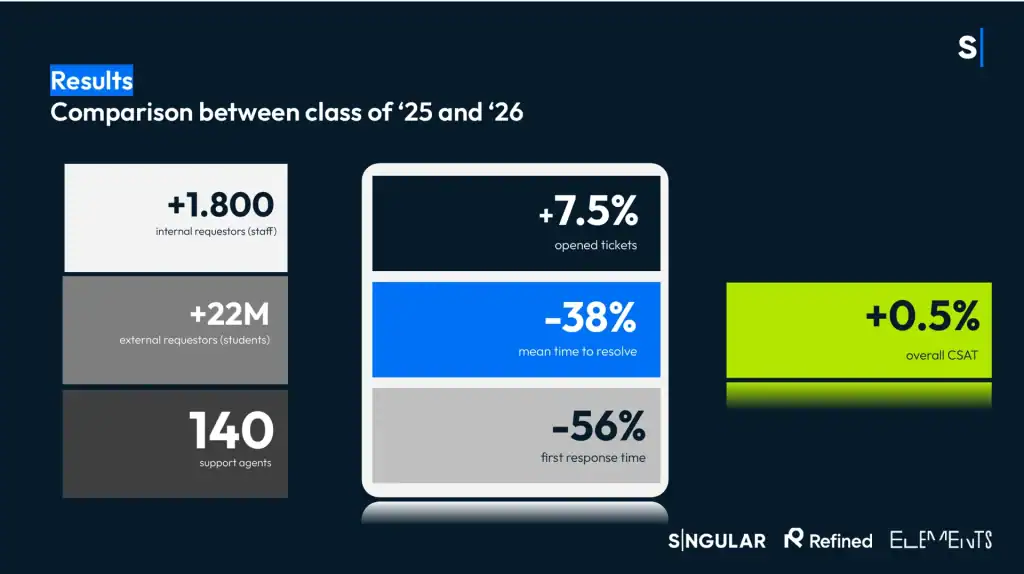
After deploying Elements Connect, Nebrija’s average ticket resolution time dropped by 38%. Agents stopped switching between systems at every triage step; the student context they needed was already on the ticket when they opened it.
The improvement is directly tied to eliminating manual context lookup. Before the implementation, an agent opening a ticket about a student request had to: leave Jira, log into the student information system, search for the requester, read the relevant data, and then return to Jira to act. That sequence added time to every single interaction. With Elements Connect, that sequence no longer exists.
Note: Nebrija’s broader JSM transformation, led by Sngular and also involving Refined for portal experience, delivered additional service improvements at scale. The 38% resolution time reduction is specifically attributed to the Elements Connect deployment and the contextual data it surfaces on each work item.
Why does surfacing external data in Jira matter?
This is a practical example of what becomes possible when external data is treated as a first-class part of the service workflow, not an afterthought.
Nebrija’s agents did not get faster by working harder. They got faster because the information they needed was already there when they needed it. The system did the lookup for them.
The same pattern applies far beyond higher education. Any team managing support in Jira, where agents routinely need customer records, employee data, asset history, or account status before they can act, can follow the same approach with Elements Connect.
Whether you’re handling IT requests, HR onboarding, customer support, or field service operations, connecting your external data sources to Jira is one of the highest-leverage changes you can make to your service operation.
What’s next for Nebrija’s Jira rollout?
With the data foundation in place, Nebrija and Sngular are now looking at how to extend the value of Elements Connect across the organisation. The immediate priority is Step 1 of that roadmap: connecting to more data sources within Nebrija’s ERP to bring additional teams onto Jira Service Management.
Two concrete initiatives are underway:
- Connecting to more ERP data sources: as more departments join JSM, Elements Connect will be configured to query additional endpoints within Nebrija’s ERP, giving each new team the same contextual data their agents need at triage, without duplicating data or building new integrations from scratch.
- Converting static fields to Live Fields: the next configuration step is moving from cached data to true live fields, so that the information displayed on a ticket reflects the exact state of the source system at the moment the agent reads it. For a university environment where enrolment status, payment records, or administrative flags can change between the moment a ticket is submitted and the moment it is triaged, accurate real-time data is not a nice-to-have; it directly affects the quality of the response.
This maturity curve is worth noting for any organisation planning a similar implementation. Start with the highest-friction data lookup your agents face today. Get that into JSM. Then expand to additional sources and refine the freshness of the data as usage scales.
FAQ
Q: What is the difference between a Jira integration and displaying external data in Jira?
A Jira integration typically connects two tools so that actions in one trigger actions in the other, for example, creating a GitHub issue from a Jira ticket. Displaying external data in Jira is different: it means reading data from an external system and showing it as context inside the Jira interface, without necessarily creating or modifying anything in either system. The goal is to give agents information at the right moment, not to synchronise workflows.
Q: Does Elements Connect require coding skills to configure?
No. The core configuration, defining data sources, setting query paths, and mapping response fields to Jira custom fields, is done through the Elements Connect UI. FreeMarker templating is used for dynamic query logic, which requires some familiarity with template syntax but is not full programming. Most Jira admins comfortable with Jira automation rules can configure Elements Connect without developer support.
Q: Can Elements Connect work with any REST API, or only specific systems?
Elements Connect works with any REST API that returns JSON or XML, as well as SQL databases and LDAP directories. It is not tied to specific vendors or platforms. As long as the data source is accessible from the Jira Cloud instance, Elements Connect can query it. This makes it applicable to student information systems, HR platforms, ERP systems, CRMs, and any other system of record an organisation maintains.
Q: What specifically caused Nebrija’s response time to drop by 38%?
The reduction came from eliminating the manual context-lookup step that preceded every triage decision. Before Elements Connect, agents had to leave Jira, log into the student information system, find the requester’s record, and return to Jira before they could act. Elements Connect removed that sequence entirely by surfacing live student data, enrolment status, faculty, programme, administrative flags, directly on the ticket at load time.
Q: Is this approach applicable outside higher education?
Yes. The underlying pattern applies anywhere agents regularly need information from outside Jira before they can act on a request: IT and HR teams needing employee records, customer support teams needing order history or CRM data, field service teams needing asset and maintenance history, and financial services teams needing account status or compliance flags. The configuration approach is the same in each case.
Try Elements Connect today