





Elements Connect vs. Assets: store data or make it work in Jira?
If you already know Elements Connect exists, chances are you’ve also asked: “Why do I need it if wealready has Assets?” It’s a fair question, because both can surface data in Jira. The difference is how they do it, where your source of truth lives, and what it costs you in time, freshness, and maintenance.
In this article, we’ll compare Elements Connect and Assets with a simple lens:
- Assets is best when you want to build and manage your database inside Jira, but it can have limitations for some use cases.
- Elements Connect is best when your data already lives outside Jira and you want to use it inside, without copying it, without delays, and without imports.
Let’s break it down.

Choosing the model: build a repository vs. connect to the source
Most teams don’t struggle with having data, they struggle with using the right data at the right moment inside Jira: during ticket creation, triage, change approval, incident response, audits, or reporting.
That’s where the core difference appears:
Assets: copy data into Jira
Assets is designed around object schemas, object types, attributes, and relationships. It’s powerful if you want Jira to own the asset model and store it long-term.
Elements Connect: keep data where it is, and fetch it live
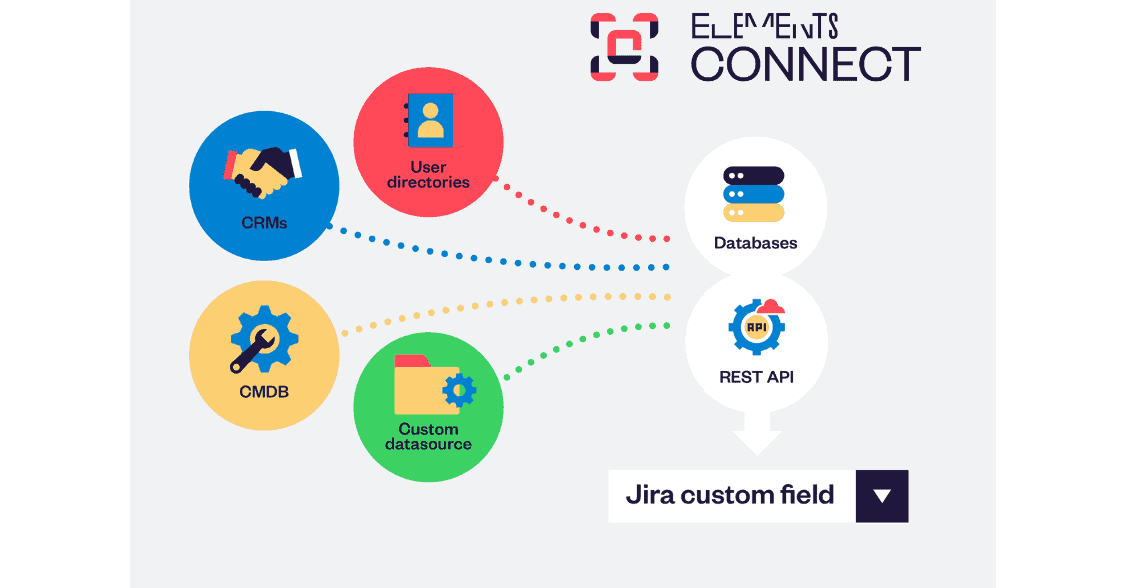
Elements Connect is designed to integrate external sources (databases, REST APIs, directories, CRMs…) intoJira issues and display or select values directly in Jira fields, often dynamicallyand based on the issue context.
So if your reality is: “Our data lives outside Jira and we don’t want to duplicate it”, you’re already leaning toward Elements Connect.
What Assets is great at (and why teams love it)
Assets shines when your goal is to model configuration items and relationships inside Jira, like servers, laptops, applications, services, owners, locations, dependencies, and make that usable in ITSM workflows (incidents, problems, changes).
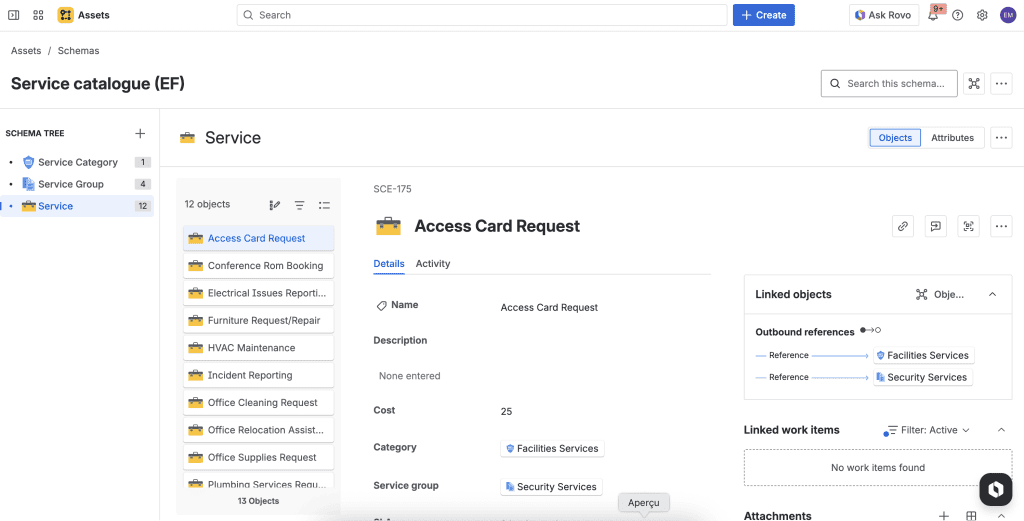
It supports:
- object schemas and structured asset models
- integrations and imports (CSV/JSON and other sources)
- a REST API for programmatic access (scripts, automation and external integrations)
If your organization wants Jira to act as the central hub where operational data is consolidated and maintained, Assets is an obvious choice
But a lot of teams don’t actually want to move all their operational data into Jira. They just want the app to use it.
The friction point: external data + Assets often means imports (not real time)
When your source of truth is outside Jira (ERP, HRIS, finance tools, IAM, internal databases, data warehouse, CMDB, etc.), using Assets typically involves importing it on a schedule.
Atlassian’s own documentation describes scheduled imports that run at regular intervals (once, daily, weekly, monthly). That’s great for keep it updated from time to time, but it’s not the same as live.
This is where teams start feeling pain: you export from a system, then transform/match fields. You import into Assets and have to do troubleshoot mappings. But you will have to repeat it at some point.
Even with scheduled imports, your Jira view of the data is only as fresh as your last run. For many workflows, access requests, change approvals or incident response, stale data creates real risk.
If you really need to synchronize external data sources in real time, this requires custom scripts or third-party tools.
Avoiding duplication: why having two sources of truth becomes expensive
The hidden cost of import-based approaches isn’t just setup time, it’s data duplication.
When you copy data into Assets, you’re now maintaining the original system (the true source), and a mirrored version.
And duplication has side effects:
- drift (someone updates the source but Jira lags behind)
- reconciliation work
- ownership confusion (“Which one is correct?”)
- audit headaches (“Why does Jira show something else?”)
Elements Connect is built specifically to avoid that trap: for dynamic fields, it stores a key into Jira and retrieves the value dynamically from the external source, thanks to that key.
That design is exactly what you want when your external system is the source of truth.
Dynamic, context-aware and controlled: Elements Connect’s sweet spot
Elements Connect is designed to bring external data into Jira work items through connected custom fields. It supports a wide range of sources (SQL/databases, REST APIs, LDAP/directories, CRMs, and more).
Theses capabilities are especially important for teams comparing it with Assets:
- Dynamic data in Jira custom fields
Elements Connect fields can run dynamic queries that adapt instantly to the issue context. The values available in a field can change depending on the project, issue type or any other fields. - Guided forms with dependencies (attributes + custom fields)
Elements Connect makes forms behave intelligently through dependencies. You can filter a field based on attributes from a previously selected value (for example, show only products covered by the customer’s contract level).
You can also build dependencies based on Jira custom fields, so selections stay consistent across workflows and users are guided toward valid choices. - Large datasets without the picklist pain
Elements Connect custom fields are designed for very large (even “unlimited”) datasets, including sources returning more than 1,000 options. This matters because many data lists are huge like customers/accounts, products/SKUs, devices and can quickly becomes unmanageable. - Read-only fields for trusted external data
When you don’t want users editing certain values, Elements Connect can display external information as read-only in Jira, ideal for identifiers, ownership, compliance data, or contract details.
A practical comparison (what changes day-to-day)
Here’s the simplest way to compare how the two approaches behave in real teams:
| What you need | Assets (typical approach) | Elements Connect (typical approach) |
|---|---|---|
| External data is the primary reference system | Import it into Assets, keep it synced on a schedule | Keep it external, fetch it dynamically into Jira fields |
| Data must be real-time | Depends on import frequency | Designed for real-time field values |
| Avoid duplicating data | You’re storing a copy in Jira | Live fields store a key or value and retrieve what to display dynamically |
| Context-aware fields options | Usually depends on how data is modeled inside Jira and how you configure object selection | Dynamic queries that adapt instantly to issue context (project/request type/field values) |
| Very large option lists | You’ll manage volume and structure inside Assets | “Unlimited data sets” and large option handling are built in |
So… should you choose Elements Connect or Assets?
Here’s the simplest decision rule:
Choose Assets when…
You want Jira to own the asset model, with object relationships managed and maintained inside Jira.
Choose Elements Connect when…
Your source of truth is outside Jira, and you want Jira users to select, view, and use that data dynamically, with minimal duplication and strong support for large datasets.
Common examples include dynamic SLA prioritization from CRM tiers, onboarding requests powered by Azure AD data, and support tickets enriched with Salesforce/HubSpot context.
Use both when…
Assets is your internal CMDB, but you still need to pull live data from other systems (CRM, HR, finance, IAM, databases) into Jira fields to drive workflows without importing everything first. (Find how to configureAssets as a datasource in Elements Connect)
It is particularly interesting for enterprise that use Assets but don’t want to import everything into it because of sensitive data (customer informations for exemple).
The bottom line
If your team’s workflow looks like “data lives outside Jira, but Jira needs it”, then importing that data into Assets can feel like building a second system to maintain, especially when you care about freshness and scale. Scheduled imports help, but they’re still not the same as real-time.
Elements Connect is built for the opposite pattern: leave the external data where it belongs, and bring it into Jira only when and where it’s needed, in dynamic, real-time fields designed to handle large datasets.
Curious how Elements Connect brings your external data inside Jira Cloud?