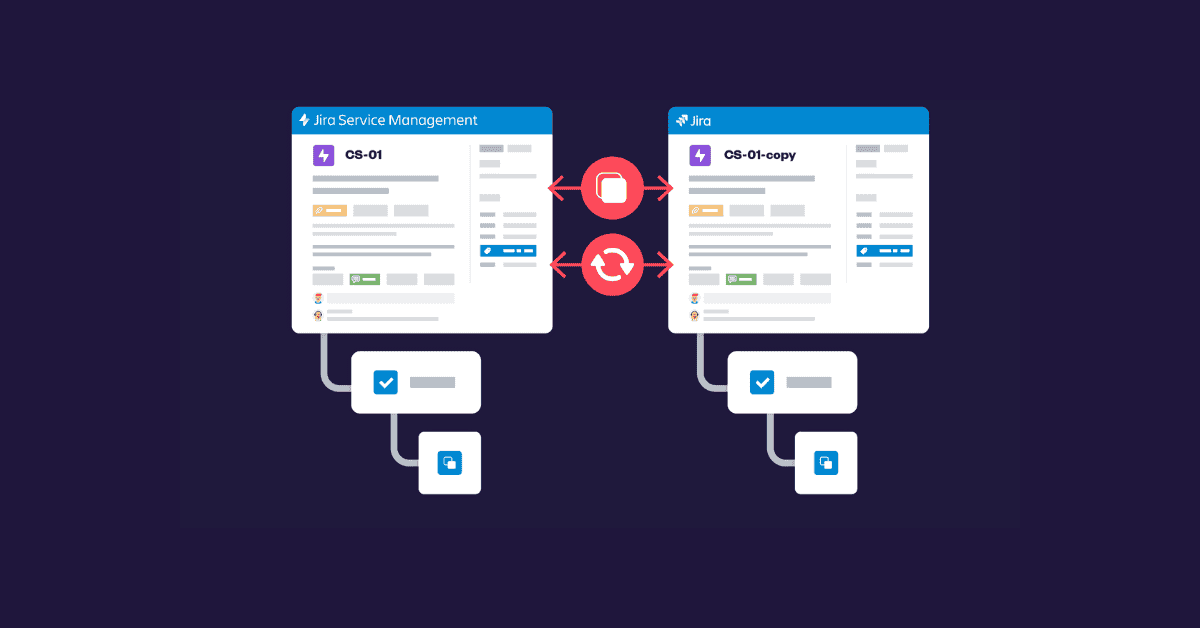










In today’s enterprise environments, teams rarely work in isolation. Organizations increasingly rely on Jira to manage a wide array of spaces: from software development and IT operations to HR processes and customer service workflows. As companies scale, however, a common and often painful challenge emerges: the need to share and synchronize work items across multiple Jira spaces or even separate Jira instances. While Jira performs exceptionally well within a single space, cross-space and cross-instance collaboration often exposes limitations that disrupt workflows, slow delivery, and create operational friction. What looks simple on the surface quickly becomes difficult to manage in practice.
The growing need for cross-space (formerly cross-project) collaboration
As teams grow and mature, spaces that were once fully independent begin to overlap. Different teams may work on the same product, service, or initiative, each operating within its own Jira space with tailored workflows, fields, and work types.
A single feature request, bug, or operational task can easily involve several teams. One team may track implementation, another testing, and a third deployment or customer communication. Without reliable synchronization, each team ends up maintaining its own version of the same work. Information becomes scattered, effort is duplicated, and reporting starts to lose credibility.
Over time, this fragmentation affects visibility and accountability. Leaders struggle to understand true progress, dependencies are missed, and teams are often unsure who owns which part of the work at any given moment. Instead of enabling collaboration, Jira spaces can unintentionally reinforce silos.
The challenge becomes even more pronounced in organizations running multiple Jira instances. It’s common to see one instance for internal development, another for partners or vendors, and a third for customer-facing work. These separations are often necessary for security, compliance, or organizational reasons, but they come at a cost.
Updates made in one instance frequently need to be copied manually into another. This manual effort takes time, introduces errors, and creates delays. Over time, teams may stop trusting Jira as a reliable source of truth and rely instead on meetings, chat messages, or spreadsheets to confirm the real status of work. When that happens, Jira loses much of its value as a coordination tool.
Native Jira Automation challenges in practice
Jira’s built-in automation is a powerful and flexible capability. For many teams, it successfully supports everyday tasks such as copying work items, updating fields, assigning users, and sending notifications. Within a single space, or between closely aligned spaces, automation can significantly reduce manual effort.
However, as organizations move into more advanced synchronization scenarios, practical limitations begin to surface.
Directional updates
Automation rules are typically designed around a single direction of data flow. While it is technically possible to build two-way synchronization, doing so often requires multiple interdependent rules. As the number of spaces grows, these rule sets become harder to reason about, debug, and maintain.
Field alignment
Native automation supports many field types, but differences in custom fields and schemas quickly add complexity. Even fields with the same name may behave differently across spaces. Maintaining alignment often requires careful mapping and frequent adjustments as schemas evolve.
Comments and attachments
Work items are not just collections of fields. They are living records of collaboration. Comments, attachments, and ongoing discussions contain critical context for decision-making. Native automation offers limited support for synchronizing this type of rich, dynamic content, especially when updates happen on both sides.
Cross-instance scope
Within a single Jira environment, automation is relatively strong. True cross-instance synchronization, however, falls outside Jira’s native capabilities. Organizations usually need integrations or external mechanisms to bridge this gap securely and reliably.
As requirements become more complex, many teams end up combining Jira native automation with additional tools or custom processes to keep information consistent across their Jira landscape.
Why synchronization is complex?
The difficulty of cross-space and cross-instance synchronization is not purely technical. Much of the complexity comes from how Jira is structured and how teams adapt it to their needs.
Divergent workflows and statuses
Each Jira space reflects the way a team works. Even similar work types can follow very different workflows. Synchronizing statuses requires thoughtful mapping to preserve meaning, not just copying values. A status like “In Review” or “Blocked” may represent very different realities in different teams, and mismatches can lead to confusion or delays.
Field and schema differences
Custom fields are rarely standardized across an organization. One team may track priority using a dropdown, another with numeric scoring, and a third may not track it at all. Some fields may exist only in certain spaces. Synchronization often requires transforming data, not simply copying it, which adds complexity and ongoing maintenance.
Preserving comments and context
Work items are more than structured data. They are conversations. Comments, attachments, and discussion threads provide essential context. Synchronizing this information becomes particularly challenging when multiple teams update the same item in parallel. Without careful handling, context can be lost or fragmented.
Permissions and security
Cross-space or cross-instance synchronization must also respect Jira’s granular permission model. Teams may have different visibility requirements, and sensitive information cannot simply be copied indiscriminately. Ensuring that synchronized work items remain secure and compliant while still useful for collaboration adds another layer of complexity.
Change management and governance
Finally, there is a human element. Synchronization introduces the risk of overwriting changes, creating conflicting updates, or losing important history. Organizations must carefully define rules for who can update what, when, and how. Without clear governance, synchronization can create more problems than it solves.
The main goals and challenges teams face during synchronization are summarized in the table below.
| GOAL | CHALLENGE |
| Single source of truth | Multiple copies of the same work |
| Smooth team handoff | Statuses mean different things |
| Consistent reporting | Fragmented or out-of-sync data |
| Easy collaboration | Conversations split across spaces |
| Low admin effort | High maintenance |
Organizational impact
When cross-space or cross-instance synchronization is poorly handled, the impact is tangible and far-reaching.
- Inefficiency: Teams spend time duplicating work, manually updating work items, or reconciling conflicting information.
- Reduced visibility: Leadership lacks a reliable, real-time view of progress and dependencies.
- Inconsistent reporting: Dashboards and metrics become misleading because data is incomplete or outdated.
- Lower morale: Teams grow frustrated when they are forced to work around fragmented or redundant systems.
What begins as a reasonable need for collaboration can quickly turn into a source of organizational friction.
Why does this problem persist?
Despite the obvious pain points, cross-space and cross-instance synchronization remain unsolved for most organizations. The reasons are clear:
- Some native automations are limited and brittle for complex synchronization scenarios.
- Manual approaches are time-consuming and error-prone.
- Schema differences, workflow variations, and permission constraints create a moving target that is hard to maintain.
- Organizational growth and scaling make ad-hoc solutions increasingly unsustainable.
What often looks like a simple “copy and keep in sync” operation is, in reality, anything but simple. Behind this seemingly straightforward need lies a multi-dimensional challenge that spans technology, process design, and governance. Each additional space, workflow variation, or permission rule adds another layer of complexity, turning synchronization into an ongoing organizational effort rather than a one-time technical setup.
Moving toward awareness
The first step toward improvement is recognizing that synchronization is inherently hard. From there, organizations can take a more intentional and realistic approach.
- Map differences early: Document workflows, fields, and permission models across spaces to identify where alignment is required.
- Define governance: Clarify who owns the synchronized data, how conflicts are resolved, and which updates take precedence.
- Standardize where possible: Shared fields and workflows reduce complexity, even if full standardization is not feasible.
- Leverage automation wisely: Jira automation works well for many scenarios, and when requirements become more complex, it can be enhanced with purpose-built synchronization approaches.
Even with these steps, it is important to accept that cross-space and cross-instance synchronization is inherently challenging. Organizations that understand this upfront can plan accordingly, reducing frustration and inefficiency.
Cross-space and cross-instance synchronization in Jira is a deceptively simple problem. Differences in workflows, fields, permissions, and collaboration patterns turn it into a significant organizational challenge.
While Jira’s native automation can support basic one-way use cases, reliable two-way synchronization across spaces or instances requires careful planning, strong governance, and the right supporting tools.
For organizations navigating complex Jira environments, awareness and intentional strategy make a meaningful difference.
In practice, many teams turn to dedicated solutions such as Elements Copy & Sync to handle synchronization more reliably.
By supporting controlled, two-way synchronization across spaces and instances, and by preserving fields, statuses, and contextual information like comments, tools like Elements Copy & Sync help teams reduce manual effort while maintaining data consistency. Rather than replacing Jira’s native capabilities, they complement them in scenarios where scale, complexity, and governance make native automation difficult to sustain.
About the author
Anahit Sukiasyan is an Atlassian Community Champion in Yerevan, Armenia, recognized for her dedication to fostering collaboration, innovation, and knowledge-sharing within the global Atlassian ecosystem.
With a strong background in IT Service Management, she has extensive hands-on experience with Jira, Jira Service Management, Confluence, Trello, and Jira Product Discovery, working across both Cloud and Data Center environments. Anahit specializes in end-to-end Jira project configuration, tailoring workflows, automation, and reporting to align with diverse business needs and improve operational efficiency.