




Elements Connect vs. Assets: store data or make it work in Jira?
If you already know Elements Connect exists, chances are you’ve also asked: “Why do I need it if wealready has Assets?” It’s a fair question, because both can surface data in Jira. The difference is how they do it, where your source of truth lives, and what it costs you in time, freshness, and maintenance.
In this article, we’ll compare Elements Connect and Assets with a simple lens:
- Assets is best when you want to build and manage your database inside Jira, but it can have limitations for some use cases.
- Elements Connect is best when your data already lives outside Jira and you want to use it inside, without copying it, without delays, and without imports.
Let’s break it down.

Choosing the model: build a repository vs. connect to the source
Most teams don’t struggle with having data, they struggle with using the right data at the right moment inside Jira: during ticket creation, triage, change approval, incident response, audits, or reporting.
That’s where the core difference appears:
Assets: copy data into Jira
Assets is designed around object schemas, object types, attributes, and relationships. It’s powerful if you want Jira to own the asset model and store it long-term.
Elements Connect: keep data where it is, and fetch it live
Elements Connect is designed to integrate external sources (databases, REST APIs, directories, CRMs…) intoJira issues and display or select values directly in Jira fields, often dynamicallyand based on the issue context.
So if your reality is: “Our data lives outside Jira and we don’t want to duplicate it”, you’re already leaning toward Elements Connect.
What Assets is great at (and why teams love it)
Assets shines when your goal is to model configuration items and relationships inside Jira, like servers, laptops, applications, services, owners, locations, dependencies, and make that usable in ITSM workflows (incidents, problems, changes).
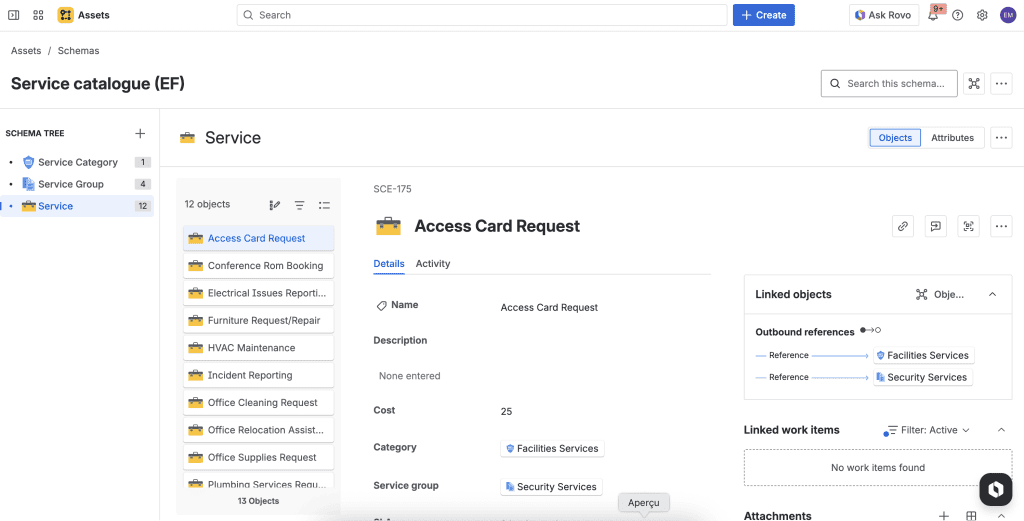
It supports:
- object schemas and structured asset models
- integrations and imports (CSV/JSON and other sources)
- a REST API for programmatic access (scripts, automation and external integrations)
If your organization wants Jira to act as the central hub where operational data is consolidated and maintained, Assets is an obvious choice
But a lot of teams don’t actually want to move all their operational data into Jira. They just want the app to use it.
The friction point: external data + Assets often means imports (not real time)
When your source of truth is outside Jira (ERP, HRIS, finance tools, IAM, internal databases, data warehouse, CMDB, etc.), using Assets typically involves importing it on a schedule.
Atlassian’s own documentation describes scheduled imports that run at regular intervals (once, daily, weekly, monthly). That’s great for keep it updated from time to time, but it’s not the same as live.
This is where teams start feeling pain: you export from a system, then transform/match fields. You import into Assets and have to do troubleshoot mappings. But you will have to repeat it at some point.
Even with scheduled imports, your Jira view of the data is only as fresh as your last run. For many workflows, access requests, change approvals or incident response, stale data creates real risk.
If you really need to synchronize external data sources in real time, this requires custom scripts or third-party tools.
Avoiding duplication: why having two sources of truth becomes expensive
The hidden cost of import-based approaches isn’t just setup time, it’s data duplication.
When you copy data into Assets, you’re now maintaining the original system (the true source), and a mirrored version.
And duplication has side effects:
- drift (someone updates the source but Jira lags behind)
- reconciliation work
- ownership confusion (“Which one is correct?”)
- audit headaches (“Why does Jira show something else?”)
Elements Connect is built specifically to avoid that trap: for dynamic fields, it stores a key into Jira and retrieves the value dynamically from the external source, thanks to that key.
That design is exactly what you want when your external system is the source of truth.
Dynamic, context-aware and controlled: Elements Connect’s sweet spot
Elements Connect is designed to bring external data into Jira work items through connected custom fields. It supports a wide range of sources (SQL/databases, REST APIs, LDAP/directories, CRMs, and more).
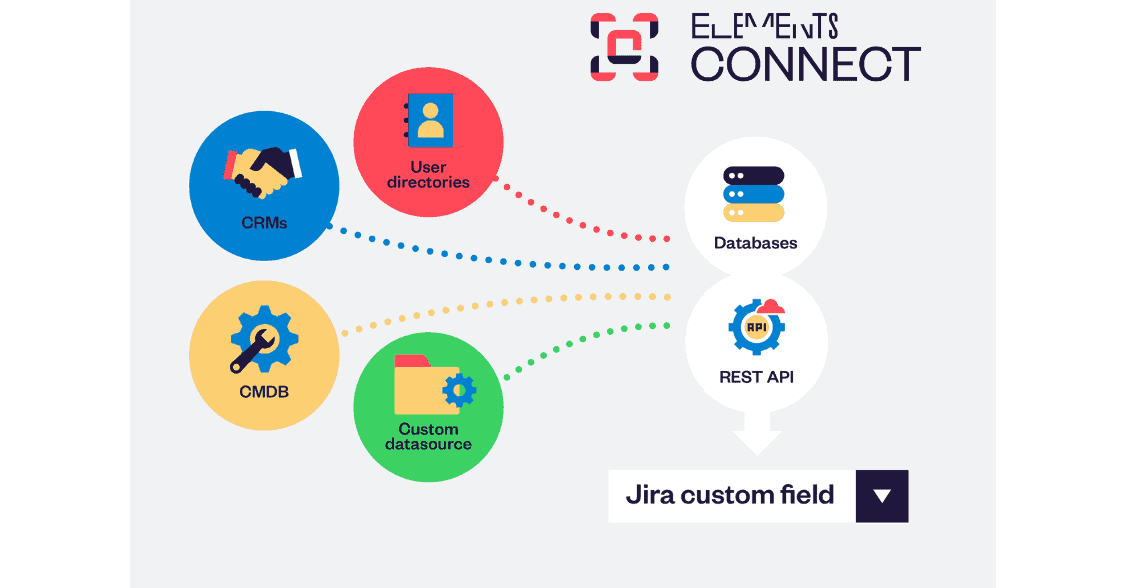
Theses capabilities are especially important for teams comparing it with Assets:
- Dynamic data in Jira custom fields
Elements Connect fields can run dynamic queries that adapt instantly to the issue context. The values available in a field can change depending on the project, issue type or any other fields. - Guided forms with dependencies (attributes + custom fields)
Elements Connect makes forms behave intelligently through dependencies. You can filter a field based on attributes from a previously selected value (for example, show only products covered by the customer’s contract level).
You can also build dependencies based on Jira custom fields, so selections stay consistent across workflows and users are guided toward valid choices. - Large datasets without the picklist pain
Elements Connect custom fields are designed for very large (even “unlimited”) datasets, including sources returning more than 1,000 options. This matters because many data lists are huge like customers/accounts, products/SKUs, devices and can quickly becomes unmanageable. - Read-only fields for trusted external data
When you don’t want users editing certain values, Elements Connect can display external information as read-only in Jira, ideal for identifiers, ownership, compliance data, or contract details.
A practical comparison (what changes day-to-day)
Here’s the simplest way to compare how the two approaches behave in real teams:
| What you need | Assets (typical approach) | Elements Connect (typical approach) |
|---|---|---|
| External data is the primary reference system | Import it into Assets, keep it synced on a schedule | Keep it external, fetch it dynamically into Jira fields |
| Data must be real-time | Depends on import frequency | Designed for real-time field values |
| Avoid duplicating data | You’re storing a copy in Jira | Live fields store a key or value and retrieve what to display dynamically |
| Context-aware fields options | Usually depends on how data is modeled inside Jira and how you configure object selection | Dynamic queries that adapt instantly to issue context (project/request type/field values) |
| Very large option lists | You’ll manage volume and structure inside Assets | “Unlimited data sets” and large option handling are built in |
So… should you choose Elements Connect or Assets?
Here’s the simplest decision rule:
Choose Assets when…
You want Jira to own the asset model, with object relationships managed and maintained inside Jira.
Choose Elements Connect when…
Your source of truth is outside Jira, and you want Jira users to select, view, and use that data dynamically, with minimal duplication and strong support for large datasets.
Common examples include dynamic SLA prioritization from CRM tiers, onboarding requests powered by Azure AD data, and support tickets enriched with Salesforce/HubSpot context.
Use both when…
Assets is your internal CMDB, but you still need to pull live data from other systems (CRM, HR, finance, IAM, databases) into Jira fields to drive workflows without importing everything first. (Find how to configureAssets as a datasource in Elements Connect)
It is particularly interesting for enterprise that use Assets but don’t want to import everything into it because of sensitive data (customer informations for exemple).
The bottom line
If your team’s workflow looks like “data lives outside Jira, but Jira needs it”, then importing that data into Assets can feel like building a second system to maintain, especially when you care about freshness and scale. Scheduled imports help, but they’re still not the same as real-time.
Elements Connect is built for the opposite pattern: leave the external data where it belongs, and bring it into Jira only when and where it’s needed, in dynamic, real-time fields designed to handle large datasets.
Curious how Elements Connect brings your external data inside Jira Cloud?
The gap between Jira workflows and external systems
Jira is often described as the “source of truth” for work: work items capture what needs to happen, who owns it, and when it’s done.
In reality, the truth is usually scattered across other systems. Customer context lives in a CRM like Salesforce or HubSpot, incidents often start in observability platforms, budgets in finance tools, identity and team structure live in user directories like Azure AD or Okta, and assets live in CMDBs.
Whether you’re running Jira or Jira Service Management (JSM), the moment you try to bring that external data into Jira, the complexity shows up fast.
If you’ve ever tried to bring external context into Jira, you’ve probably seen how quickly it gets complicated. This article breaks down the most common challenges Jira admins and adjacent teams face when connecting external data into Jira, so you can recognize the pitfalls early and plan around them.
Authentication and access: the first complications
Most external systems require authentication and that’s where integration projects can slow down. Even with a documented API, the mechanics of getting secure access into the right environment often takes longer than expected.
In Jira Cloud, using service accounts and managing token rotation is usually mandatory, but it also adds operational overhead and requires clear ownership between IT and Jira admins.
The main blockers are:
- Security requirements for credentials: Storing tokens securely, rotating them, and ensuring they aren’t tied to a real person’s account.
- Different authentication models across tools: One system supports OAuth, another only offers API keys, another requires SSO-backed service accounts.
Add the needs of security reviews, allowlists, scope validation and audit requirements, and a simple connection can quickly become harder than expected.
Permissions and data visibility: a mismatch between Jira and external systems
Jira’s permission schemes and issue security levels are powerful, but they don’t automatically map to the external system’s access rules. This mismatch is particularly sensitive in JSM, where customers, and agents can have very different views of the same ticket.
The risk cuts both ways. If access to the connected data is too restricted, users can’t retrieve the context they need. But add external data to the wrong place and sensitive information can end up unintentionally exposed.
ASalesforce data like an ARR or Contract Value field appears on a JSM ticket visible to customers because the data was placed in the portail instead of work item-only field, available for agents.
Learn how to easily connect Salesforce external data in Jira.
Data modeling and mapping: the reality of simple fields
In theory, you take data from a system and display it in Jira. In practice, both sides have their own data models, and you spend most of your time translating between them.
This gets even more complex during a migration or a Jira configuration cleanup, when teams rename fields, consolidate projects, or change how issues are categorized across Jira and JSM.
Typical mapping problems include:
- Different identifiers: Is the join key an email, an account ID or a contract number? Is it stable over time?
- Custom fields sprawl: Jira instances often have hundreds of custom fields, many of which are inconsistently used across projects.
- Data formats: Dates, currencies, multi-select values, and hierarchical objects (like assets or accounts) don’t always fit neatly into Jira fields.
- Issue type variability: What belongs on a Bug vs. a Story vs. an Incident vs. a Service Request?
This is where connecting external data stops being an integration task and becomes a product design task: you’re designing how people will consume that data in the flow of work.
Freshness and timing: real-time expectations vs. real-world limits
Users tend to assume connected data updates instantly. But real-time is expensive, technically and operationally.
External systems may enforce API rate limits. Some integrations rely on polling that creates lag, while event-driven approaches can fail if webhooks are dropped or retries aren’t handled properly. At the same time, loading external data directly into the Jira issue view can create performance issues, especially in large instances.
This is also where scale shows up. A connection that works perfectly for a single issue can become brittle when you need to update thousands of tickets, backfill historical data, or handle spikes during incidents. When data freshness is inconsistent, trust erodes quickly. Teams end up asking, “Is this up to date?” and the moment that question becomes common, the integration stops delivering value.
InHubSpot, deal information can change frequently. If Jira pulls information in real time when the ticket is opened, the issue view becomes slow. If you don’t update regularly, agents will see outdated information.
Discover how to connect external data in HubSpot with our use case.
Maintenance and change management: the integration that breaks quietly
Even when an integration works, it rarely stays stable forever. Jira configurations evolve, fields get renamed, workflows change, permission schemes are updated, and external tools deprecate endpoints or alter authentication requirements.
The most painful failures are the quiet ones. A mapping breaks and the data stops updating, but nothing visibly crashes, then users gradually stop trusting what they see in issues and dashboards.
Maintenance also suffers when ownership is unclear. When something breaks, who is responsible for diagnosing it, fixing it, and communicating the impact? If the answer is “it depends,” the integration becomes a long-term risk rather than a long-term asset.
Okta/Azure AD: MFA rule changes, certificate rotation, or group modifications. The integration loses access to certain attributes (manager, orgUnit) and Jira fields become inconsistent.
Governance and compliance: the last-mile blocker
Jira tickets can contain personally identifiable information, customer details, or internal commercial data. Adding external context raises questions about data residency, retention, access controls, and audit requirements, and in regulated environments it often triggers security reviews aligned with frameworks like GDPR and SOC 2, especially around least-privilege access and traceable audit logs.
This becomes especially sensitive in service management workflows where customers interact with the same tickets agents are using internally.
Even if a solution is technically feasible, it can be blocked until governance and security concerns are addressed in a way that satisfies internal policy.
Where Elements Connect fits in
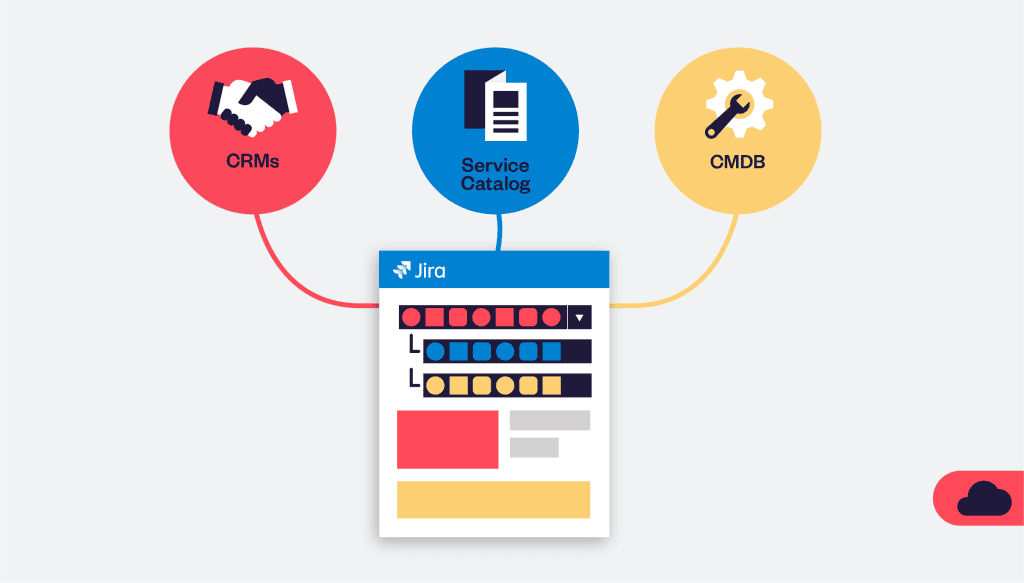
If these challenges sound familiar, it’s because connecting external data to Jira is rarely just one integration. It’s a combination of authentication, permissions, mapping, freshness, reporting, and ongoing maintenance, all under real governance constraints.
Elements Connect is designed to address many of those challenges by making it easier to bring the right external context into Jira and JSM while keeping control over who sees what, reducing manual work, and helping teams maintain reliable connections as systems evolve.
It helps you to integrate all your external data into Jira, regardless of the technology, via Rest API or Database. Its supports many authentication models to suit your needs and work as a zero-copy tools that retrieves information directly from the external system and surfaces it in Jira, so you always work with up-to-date context and don’t have to copy and store large volume of data inside Jira.
As with any integration approach, it works best when teams also put clear datasource management in place: defining which system owns which data, how updates are handled at the source, and how that information is governed as it’s surfaced inside Jira.
Finally, Elements Connect is also highly configurable, with numerous options like dynamic field customization and cascading dependencies to tailor how external data is fetched, displayed and interacted with within Jira.
If you’re looking to move beyond brittle scripts and copy/paste workflows, Elements Connect is a practical path to turning Jira into a workspace where information from outside systems is available, trustworthy, and actionable.
Curious how Elements Connect brings your external data inside Jira Cloud?
👉 Learn more here